

Texas Roadhouse Waitlist: How It Works, Wait Times & Rules
As you know, Texas Roadhouse is one of the most popular in the USA for its hand-cut steaks, fresh-baked bread, and lively dining atmosphere. Due to its popularity, a long line of guests is always waiting for a seat. Standing for hours just to get a table can feel frustrating and even lower your excitement.
To solve this problem and make dining easier, the Texas Roadhouse Waitlist System has been introduced. This smart feature allows you to reserve your spot in line before even arriving at the restaurant.
In this guide, you’ll learn what the waitlist is, How Does the Waitlist Work at Texas Roadhouse?, how to join it online or through the app, the best hours to avoid rush, and some smart tips to make your next visit special without wasting time waiting for a table.

What is the Texas Roadhouse waitlist?
Quick Answer: The Texas Roadhouse Waitlist is a modern online call-ahead system designed to cut down the time you spend in long lines. While it is not a traditional reservation, it lets you reserve your spot in line before arriving. Whether you are at home, at work, or on the way to the restaurant, you are already counted as standing in the active queue.
Waitlist vs. Call-Ahead Seating vs. Reservation
These three terms get used interchangeably by guests, but they’re not quite the same thing:
| Feature | Waitlist(App / Website / In-Person) | Call-Ahead Seating(Phone) | Traditional Reservation |
|---|---|---|---|
| How you join | Website, app, or host stand | Call your local restaurant directly | Not offered at most locations |
| When you can join | Same day, shortly before arriving | Same day, typically 20–60 mins before arrival | N/A |
| Guaranteed seating time | No | No | Yes, where offered |
| Best for | Most guests, especially smaller parties | Guests driving, at work, or preferring phone calls | Large private events — ask your local restaurant |
| Still required on arrival | Check in at the host stand | Check in at the host stand | Arrive at the agreed time |
How to Join the Texas Roadhouse Waitlist?
Skip the long lines and enjoy your meal faster at Texas Roadhouse. Here’s a step-by-step guide to joining the Texas Roadhouse waiting list through the online website, mobile app, call ahead, or by visiting the restaurant.
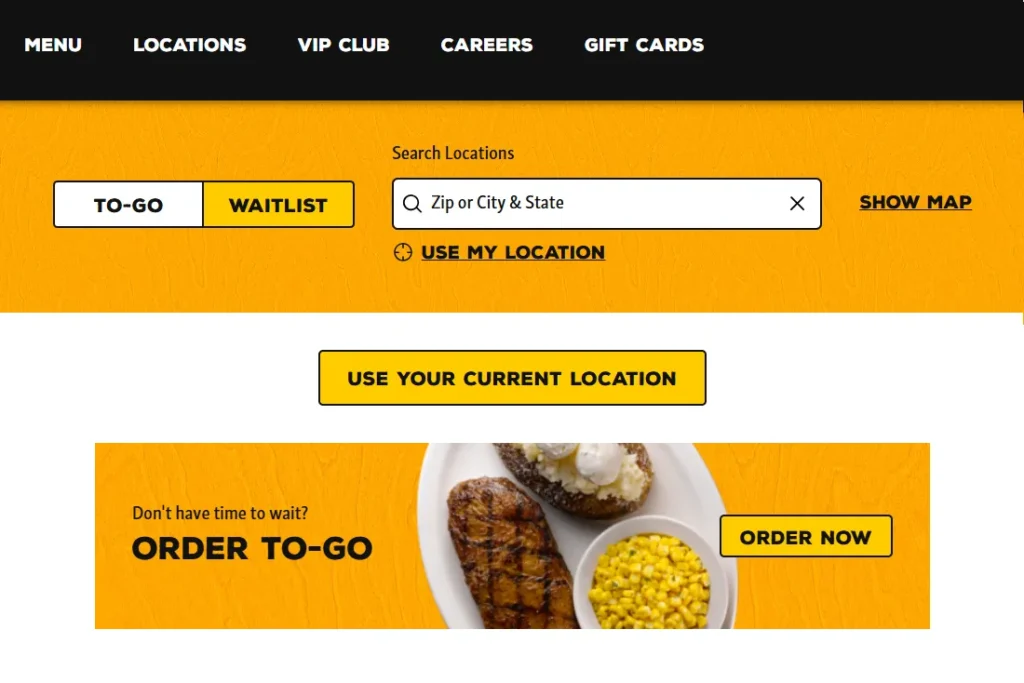
Option 1: The Online Website
You can easily join waitlist through website by following these simple steps
- Visit the Official Website
First of all, go to the Texas Roadhouse website. On the homepage, you’ll find the “Join Waitlist” option, usually at the top. - Pick Your Location
Now you need to enter your city or zip code to find the nearest restaurant. Choosing the right location will ensure your seat at the exact branch where you want to dine. - Add Your Party Size
Then select how many guests are coming with you. You can even request extras like a highchair for kids or a wheelchair for accessibility. - Enter Your Contact Details
Provide the personal info like your name, phone number, and email address. This information helps the restaurant send you updates about your table and estimated wait time. - Confirm & Get Your Wait Time
Hit the “Let’s Go” button. After that, you’ll see your estimated wait time on the screen. You’ll get a text or call when your table is almost ready. - Pro Tip: Joining online saves your time and also helps you plan your visit better. Especially on busy weekends when wait times can stretch to hours.
Option 2: The Texas Roadhouse Mobile App
Joining the waitlist by the mobile app is these simple steps:
- Download the official app on your smartphone if needed (available on both iOS and Android).
- Tap on “Waitlist” to get started, on the right in the menu.
- Use your current location or manually search to find the nearest Texas Roadhouse restaurant.
- Enter the number of people in your party and specify any special needs. These details help the staff prepare your table in advance.
- Add your contact details, like name, phone number, and email address. Then tap “Let’s Go” or “Submit.”
- Pro Tip: The app is especially useful if you’re traveling or not near to your computer. Plus, you can use it to check menu items, special deals, and even nutrition details while waiting

Option 3: Call-Ahead Seating (by Phone)
Call your local restaurant directly, give your name and party size, and ask to be added to the waitlist. This is the most reliable option if you’re driving, don’t want to use an app, or your specific location doesn’t show online waitlist access.
Option 4: Walk In and Join at the Host Stand
You can also skip all of the above and simply show up — the host will add you to the same list on-site. This is most practical during off-peak hours when the list is short anyway.
The Arrival & Check-In Process: What Really Happens when you join
Once you’ve joined the Texas Roadhouse waitlist, whichever method you used, the final step is checking in at the restaurant. Here’s the part that actually determines whether it works for you:
- You’ll get a text or call when your table is close. If you’re not near the restaurant, this is your cue to head over.
- As you arrive, head straight to the front desk. Tell the host that you’re already on the waitlist. This is the step people skip — until the host confirms you’re physically present, you’re still effectively “missing” from the live list, even if you joined an hour earlier.
- You’ll get an estimated wait time. This is based on current tables and everyone already ahead of you. It’s usually shorter than coming without a waitlist.
- Even during peak hours, you still have to wait for a table. In the meantime, you can explore the restaurant’s lively atmosphere or check out the Texas Roadhouse Menu so you’re ready to order when seated.
- Arriving on time increases your chances of being seated faster. Show up well after your table is called, and it can deliver to the next party.
Important Note: If you’ve previously replied “Stop” to a Texas Roadhouse text and want those wait-time alerts back, Texas Roadhouse’s Contact Us page confirms you can text START to 855-540-1372 to resume them — a small, verifiable detail most guides on this topic leave out entirely.
How Long Is the Wait at Texas Roadhouse?
There’s no single official number. Texas Roadhouse wait times depend heavily on location, day, and time. Based on patterns reported consistently across guests and local listings, here’s what to generally expect:
| When | Typical Pattern | Planning Tip |
|---|---|---|
| Weekdays before 5 PM | Usually the shortest waits | Good window for an early dinner or Early Dine Menu specials |
| Weekday evenings (5–8 PM) | Moderate, builds as the evening goes on | Join the waitlist before you leave home |
| Friday & Saturday dinner | Busiest window at most locations | Join well before you plan to arrive, not after |
| Weekend lunch | Can get busy with families | Join early, or arrive close to opening |
| Major holidays (Mother’s Day, Father’s Day, Valentine’s Day, graduation weekends) | Busier than a typical weekend | Build in extra time regardless of how you join |
Worth knowing before you go: Some diners have reported waits that run longer than the estimate they were first given, particularly during peak hours. This shows up often enough in guest reviews and forums that it’s worth treating any quoted time as a floor, not a ceiling. Joining early and checking in promptly are the two things most within your control.
Best Times to Join the Waitlist
If your schedule is flexible, weekday late afternoons are consistently the easiest window, with shorter waits, a calmer room, and (Monday and, at some locations, Tuesday) Early Dine Menu pricing. Before heading out, it’s worth a quick check of Texas Roadhouse hours for your specific location, since opening times and lunch availability aren’t identical everywhere.
If you’re set on a weekend, lunch is generally the gentler option — joining around 15 minutes before your target time helps, and it’s a good excuse to look over the lunch menu in advance.
Large Groups, Birthdays & Special Occasions
For bigger parties, calling ahead beats the standard online waitlist — larger tables take longer to free up, and staff can plan for you in advance. Exact cutoffs vary by location, but as a general rule, if your group is 7 or more people or you’re planning something like a birthday, call your restaurant directly rather than relying on the app. If you’re organizing something larger than a normal dine-in group, it’s also worth asking about the catering menu.
Texas Roadhouse Waitlist Rules & Late Arrival Policies
Using the Texas Roadhouse waitlist can save you a lot of time, but only if you follow the rules properly. Here’s a breakdown of what to keep in mind:
- The 10-Minute Leniency Window: If you arrive after your estimated time, most locations hold your relative position for 10–15 minutes. Beyond that, your spot is forfeit, and you must rejoin at the back of the queue.
- Complete Party Rule: Hosts will not seat your party until every single guest is inside the lobby.
- Large Group Policy (7+ Guests): Automated online waitlists restrict entries to 6 guests. Parties of 7 or more must call the store directly so the host coordinator can arrange adjacent tables.
- Skip host confirmation: An unconfirmed name can effectively fall off the active list.
- Expect identical policies: At every location, call-ahead availability and online waitlist access aren’t perfectly uniform system-wide.

Tips to Cut Your Wait Time
- Try the bar area. At many locations, bar seating turns over faster than the main dining room and still gets you the full menu.
- Split larger groups where possible. Smaller parties generally get seated sooner than big ones.
- Track your spot in the app instead of asking the host stand repeatedly.
- Go on a weekday, earlier in the evening, if your schedule allows it.
- Check the free VIP Club if it’s a birthday or special visit—it can flag occasions for select perks.
Texas Roadhouse Wait Times Myth vs. Fact
Should You Use the App, Call Ahead, or Just Walk In?
- Party of 1–5, comfortable with a smartphone → Join via the app or website before leaving home.
- Party of 1–5, but you’d rather talk to a person, or you’re driving → Call the restaurant directly.
- Party of 6+, birthday, or special occasion → Call the restaurant directly so staff can plan ahead.
- Already near the restaurant with nothing showing online → Walk in and ask the host stand.
FAQs: Frequently Asked Questions
- • Official restaurant websites
- • Public announcements when available
- • Trusted public sources
- • Public customer discussions for additional context
- • Regular updates when information changes